ChakraHQ APIs
Home
Sign In
Home
Sign In
  1. Home
  • API Keys
  • Response Format
  • Inbound Events Webhook
  • How to figure out pluginId and whatsappPhoneNumberId
  • API Rate Limits
  • Chara Chat SDK
  • Send Template Messages
    • Send Whatsapp Template Message For Process
    • Send Whatsapp Template Message For A Phone Number
    • Send Template Message (Meta API Format)
  • Send Session Messages
    • WhatsApp Messages API (pass-through)
    • Send WhatsApp session message (pass-through)
  • Message Templates - Create & Manage
    • Create WhatsApp Message Template (pass-through)
    • List WhatsApp Message Templates (pass-through)
    • Update WhatsApp Message Template (pass-through)
  • Media - Upload & Manage
    • Upload Public Media
    • Show Whatsapp Media API
    • Fetch Whatsapp Media API
    • Show Whatsapp Media Attachments API
  • Flows - Create & Manage
    • Set Business Public Key
    • Get Business Public Key
  • Groups - Create & Manage
    • Create Group
    • List Groups
    • Get group info
    • Update Group Settings
    • Delete Group
    • Get Group Invite Link
    • Reset Group Invite Link
    • Get Group Join Requests
    • Approve Group Join Request
    • Reject Group Join Request
    • Remove Group Participants
  • Leads - Create & Manage
    • Create a lead
    • Update Lead By Phone Number
  • Chat & Chat Messages
    • List chats
    • List chat messages for a chat
    • List previous messages for a phone number
  • Campaigns - Manage
    • Add a phone number to a lead campaign
    • Remove phone number from a lead campaign
  • Calling
    • Calling Settings
      • Get phone number calling settings
      • Configure or update calling settings
    • Call Permissions
      • Get call permission state
    • Calls
      • Manage a call
  • Partner Access
    • Create Connect Token
    • Update WhatsApp plugin configuration
    • Fetch WhatsApp plugin configuration
    • Deregister a WhatsApp business phone number
    • Disconnect WABA Account
  • Platform
    • Process
      • Fetch Process By Id
      • List Processes
      • Create Process
      • Update Process
      • Update Process By Primary Key
      • Delete Process
      • Delete Process By Primary Key Value
      • Bulk Create Process API
      • Bulk Update Process API
    • Task
      • Create Task API
    • User
      • List Users API
      • List Users API (V2)
      • Fetch User API
      • Fetch User API (V2)
      • Update User API
    • Photo
      • Fetch Photo API
      • Upload Photo API
      • Upload Photo API With Id
    • Background Job
      • Fetch Background Job
      • Fetch Background Job Entries API
    • Fetch Config
  • Schemas
    • Whatsapp
      • MappingType
    • WhatsAppSessionPayload
    • DeregisterPhoneNumberRequest
    • DeregisterPhoneNumberSuccessResponse
    • WhatsAppCallRecordingOptions
    • WhatsAppCallTranscriptionOptions
    • ChakraErrorResponse
    • WhatsAppCallsRequest
    • WhatsAppCallsResponse
    • WhatsAppCallHoursWeeklyEntry
    • WhatsAppCallHoursHolidayEntry
    • WhatsAppCallHours
    • WhatsAppSipServer
    • WhatsAppSipSettings
    • WhatsAppCallingSettings
    • WhatsAppPhoneNumberSettings
    • WhatsAppUpdateSettingsRequest
    • WhatsAppUpdateSettingsResponse
    • WhatsAppCallPermissionActionLimit
    • WhatsAppCallPermissionAction
    • WhatsAppCallPermissionsResponse
    • MetaErrorResponse
  1. Home

How to figure out pluginId and whatsappPhoneNumberId

Most of the WhatsApp apis will require the following parameters. This doc describes how to figure out the same
pluginId - this is a Chakra Id of your WhatsApp plugin
whatsappPhoneNumberId - this is the Meta Id of your connected WhatsApp phone number

How to figure out the pluginId#

In the WhatsApp setup page, locate the 3 dots icon next to the save button, on the top right corner
Click the same and click the "Copy Plugin Id" button
The plugin id is now copied, you can paste it where you need it
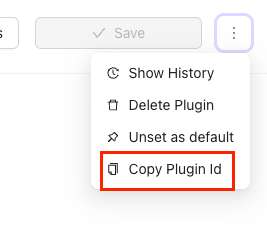
copy-plugin-id

How to figure out the whatsappPhoneNumberId#

In the WhatsApp Setup page click on the Gear icon next to "📞 WhatsApp Phone Numbers"
In the drawer that opens you will find the Meta ID of each phone number in the phone number column
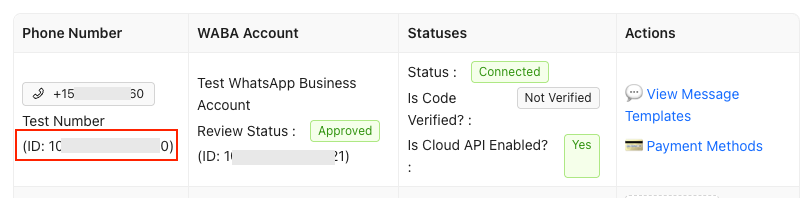
screenshot-of-whatsapp-phone-number-id
Modified at 2026-01-20 08:39:23
Previous
Inbound Events Webhook
Next
API Rate Limits
Built with