ChakraHQ APIs
Home
Sign In
Home
Sign In
  1. Send Session Messages
  • API Keys
  • Response Format
  • Inbound Events Webhook
  • How to figure out pluginId and whatsappPhoneNumberId
  • API Rate Limits
  • Send Template Messages
    • Send Whatsapp Template Message For Process
    • Send Whatsapp Template Message For A Phone Number
    • Send Template Message (Meta API Format)
  • Send Session Messages
    • WhatsApp Messages API (pass-through)
      POST
    • Send WhatsApp session message (pass-through)
      POST
  • Message Templates - Create & Manage
    • Create WhatsApp Message Template (pass-through)
    • List WhatsApp Message Templates (pass-through)
    • Update WhatsApp Message Template (pass-through)
  • Media - Upload & Manage
    • Upload Public Media
    • Show Whatsapp Media API
    • Fetch Whatsapp Media API
    • Show Whatsapp Media Attachments API
  • Flows - Create & Manage
    • Set Business Public Key
    • Get Business Public Key
  • Groups - Create & Manage
    • Create Group
    • List Groups
    • Get group info
    • Update Group Settings
    • Delete Group
    • Get Group Invite Link
    • Reset Group Invite Link
    • Get Group Join Requests
    • Approve Group Join Request
    • Reject Group Join Request
    • Remove Group Participants
  • Leads - Create & Manage
    • Create a lead
    • Update Lead By Phone Number
  • Chat & Chat Messages
    • List chats
    • List chat messages for a chat
    • List previous messages for a phone number
  • Campaigns - Manage
    • Add a phone number to a lead campaign
    • Remove phone number from a lead campaign
  • Partner Access
    • Create Connect Token
    • Update WhatsApp plugin configuration
    • Fetch WhatsApp plugin configuration
    • Disconnect WABA Account
  • Platform
    • Process
      • Fetch Process By Id
      • List Processes
      • Create Process
      • Update Process
      • Update Process By Primary Key
      • Delete Process
      • Delete Process By Primary Key Value
      • Bulk Create Process API
      • Bulk Update Process API
    • Task
      • Create Task API
    • User
      • List Users API
      • List Users API (V2)
      • Fetch User API
      • Fetch User API (V2)
      • Update User API
    • Photo
      • Fetch Photo API
      • Upload Photo API
      • Upload Photo API With Id
    • Background Job
      • Fetch Background Job
      • Fetch Background Job Entries API
    • Fetch Config
  • Schemas
    • Whatsapp
      • MappingType
  1. Send Session Messages

WhatsApp Messages API (pass-through)

POST
https://api.chakrahq.com/v1/ext/plugin/whatsapp/{pluginId}/api/{whatstappApiVersion}/{whatsappPhoneNumberId}/messages
The following API allows you to invoke the whatsapp messages api directly. This API will allow you to
send WhatsApp template messages
send WhatsApp session messages
The complete documentation for this api can be found here
Please note that chakra provides only a thin wrapper on top of the original whatsapp API.

How to figure out the pluginId#

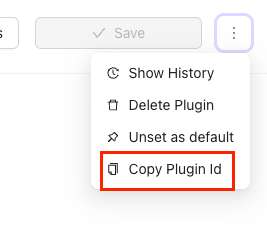
In the WhatsApp setup page, locate the 3 dots icon next to the save button, on the top right corner
Click the same and click the "Copy Plugin Id" button
The plugin id is now copied, you can paste it where you need it
copy-plugin-id

How to figure out the whatsappPhoneNumberId#

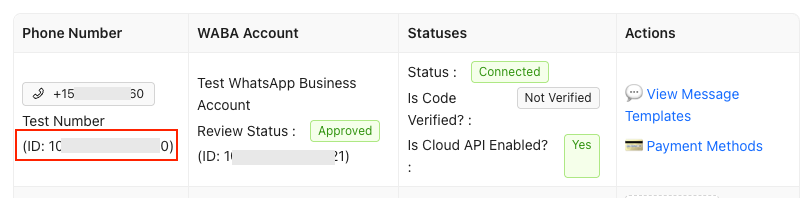
In the WhatsApp Setup page click on the Gear icon next to "📞 WhatsApp Phone Numbers"
In the drawer that opens you will find the Meta ID of each phone number in the phone number column
screenshot-of-whatsapp-phone-number-id

Detailed documentation#

The request payload can be found in the Whatsapp cloud api documentation
Whatsapp cloud api documentation for session messages - WhatsApp Cloud API Guide
Whatsapp cloud api postman collection - Postman Collection

Request

Authorization
Provide your bearer token in the
Authorization
header when making requests to protected resources.
Example:
Authorization: Bearer ********************
Path Params

Body Params application/json

Examples

Responses

🟢200Success
application/json
Bodyapplication/json

Request Request Example
Shell
JavaScript
Java
Swift
cURL
curl --location 'https://api.chakrahq.com/v1/ext/plugin/whatsapp/d83e1d23-50b8-4d87-8f92-842a0ac516f6/api/v19.0//messages' \
--header 'Authorization: Bearer <token>' \
--header 'Content-Type: application/json' \
--data '{
	"messaging_product": "whatsapp",
	"recipient_type": "individual",
	"to": "919901258433",
	"type": "template",
	"template": {
		"name": "hello_world",
		"language": {
			"policy": "deterministic",
			"code": "en_US"
		},
		"components": [
			{
				"type": "body",
				"parameters": []
			}
		]
	}
}'
Response Response Example
{
	"_data": {
		"whatsappMessageId": "wamid.HBgMOTE5OTAxMjU4NDMzFQIAERgSREM5NDZGMjRFNzc1QUFDOEExAA=="
	}
}
Modified at 2026-01-20 08:37:56
Previous
Send Template Message (Meta API Format)
Next
Send WhatsApp session message (pass-through)
Built with